Review Comments (1) Screenshots (4) Questions & Answers (1) Votes (8) Awards (2) Wiki  
(8)
iRiver
3.5.8.7
www.iriver.com
Freeware
2 116 people
Download iriver plus

47.11 MBDownloaded 2621 times

This software was checked for viruses Last month and was found to contain no viruses.
Click here to see antivirus report.
 
Video tutorial for iriver plus 3.5
Frame

Review

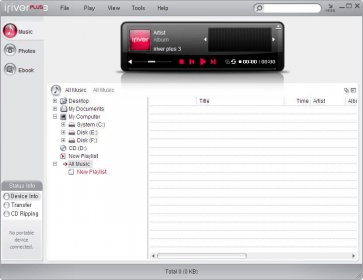
iRiver plus 3 allows you to easily manage media content of your computer. Using this application you can play your favorite music, watch video, read e-books or view your photos. If you’re a Windows user, you will find the interface of the program very familiar and easy to use.

iRiver plus 3 is optimized for iRiver products such as multimedia players, e-book readers and others. This allows users to save time when transferring data from iRiver portable devices.

Add your favorite music and videos to the media library that the program integrates. You will be able to easily enjoy your music and videos without having to know the file location on your hard drive. Also, the program integrates a feature that gives you detailed music information for every audio file in the library.

iRiver plus 3 offers you the possibility to switch between the two modes of the interface. The “Mini” mode will make the program look like the usual multimedia players (Winamp). Using the “Main player” mode you will be able to access the menu of the program and also the file browser the program integrates. The application supports all the popular audio, video and image formats. In addition, you are able to read .txt files.

iRiver plus 3 with its powerful library functions will efficiently manage all the media files from your computer,
  • Intuitive user interface
  • Free
  • Provides detailed music information for every audio file
  • None

Reviewed by: Margareta Smardan

Reviewer rating:

Reviewed: 2 months ago

Report a wrong version Report a wrong program title Suggest a correction

Screenshots

Main window Main window General Options General Options Compact view Compact view Main Interface Main Interface

Latest comments

Ken Smith(beginner) 7 months ago 
— Slow to start up, but there is a work around
Pros: It's good for organising and playing your music
Cons: Slow at times
Comment: Iriver Plus 3 can be slow to start, and seems to freeze up at times. The installation process puts "iLauncher.exe" onto your menu and it apparently checks for updates, and then starts iRiver Plus. An alternative is for you to add "iPlus3.exe" into your menu - it's much quicker. Maybe run iLauncher occasionally to see if there are any updates.
Reply
Add new comment

E-mail Address:

Password:

Register now »

Forgot password?

Sign in with:
Download Software Informer Client
Copyright © 2012, Informer Technologies, Inc. About| Privacy and terms| Help| Feedback & Support| Partners program